Redeem Spin For Free Codes
Two menu layouts, one rule: type the string exactly, then spin before the boost expires.
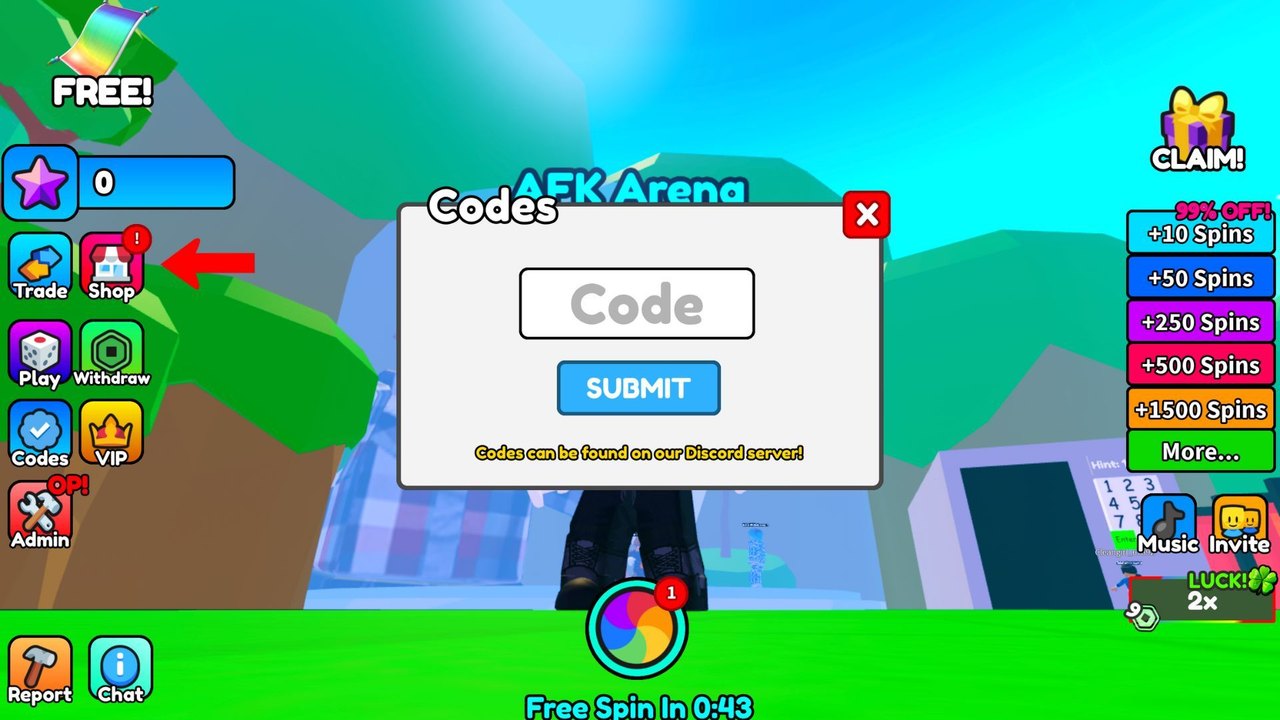
Spin For Free has used more than one codes menu since P2W Games Studio launched the current place. Players still search for a single screenshot and then get stuck because their build shows a gear instead of a Codes button, or the other way around. This page walks both layouts, then covers the errors that waste a working string.
Start from the live list on the codes hub. Have FREE copied before you open the menu so you are not alt-tabbing with the window open. After a successful redeem, leave the menu and tap the color wheel. Codes do not auto-spin.
Layout A: Gear then Redeem
This is the flow listed for the current place in September 2026.
- Load into the lobby and wait until the left HUD finishes drawing.
- Tap the gear / settings icon on the left stack, usually under Shop.
- Find the Enter Code field.
- Paste one string. Do not paste a comma-separated list.
- Tap Redeem.
- Wait for the success toast, then close the panel and spin.
If the gear opens graphics options only, you are on Layout B.
Layout B: Codes button then Submit
Older captures of the studio’s spinner show a dedicated Codes icon on the left column, under Play and Withdraw, with a checkmark glyph.
- Tap Codes.
- Type into the Code field in the center modal.
- Tap SUBMIT.
- The footer on that modal reminds you that new strings often land on Discord first. Bookmark the official links if you chase drops live.
Both layouts are case sensitive. Update1 fails. UPDATE1 is the working form.
Common failures
Already redeemed. Each code is once per Roblox account, not once per server. Rejoining will not reset it.
Expired. Update codes die when the next patch ships. Check the expired codes page before you assume a typo.
Wrong game. Search results mix Spin For Free UGC, older idle spinners, and this P2W Games Studio incremental. Confirm the creator name on the Roblox page before you hunt menus.
Spaces. A trailing space from a copy-paste is enough to fail. Delete and retype if paste looks clean but still errors.
Caps lock on mobile. Some keyboards auto-capitalize the first letter only. Turn off auto-caps for the four live strings.
After you redeem
Do not stand still with 55 unused spins. Open the how to get spins loop: AFK Arena for the 2x banner, then the color wheel at the bottom center. If luck 2x is already active on the right chip, dump the code spins during that window.
If you are brand new, return to the getting started checklist so Shop, Withdraw, and VIP are not mysteries while the timer ticks. The controls page maps every HUD icon if you cannot find Gear at all.
Redeeming is the smallest skill in the game and the one that still trips people because the UI moved. Once the four confirmed codes are in, you are done with this page until the next update notes post a new string.
Keep a notepad of what already succeeded on the account. The game does not always show a history, and it is easy to retry FREE a week later and think the hub is outdated.
Frequently Asked Questions
Quick answers players actually search for in Spin For Free.
Where is the codes button in Spin For Free?
Look on the left HUD for either a Gear icon or a Codes icon under Withdraw. Both open a text field. See the two layouts above.
Why does my code say invalid?
It is expired, already used on the account, mistyped, or you are in a different Spin For Free experience. Compare against the codes hub.
Can I redeem several codes at once?
No. One string per submit. Redeem FREE, close or clear the field, then UPDATE1, REWORK, and AUTOPAYOUTS.
Do I need to like the game to redeem?
The description warns that players who do not like the game cannot get prizes. Liking does not replace typing the code, but it is the studio's stated rule.