Spin For Free Controls
A HUD map for the left rail, right rail, and the only button that actually spends a spin.
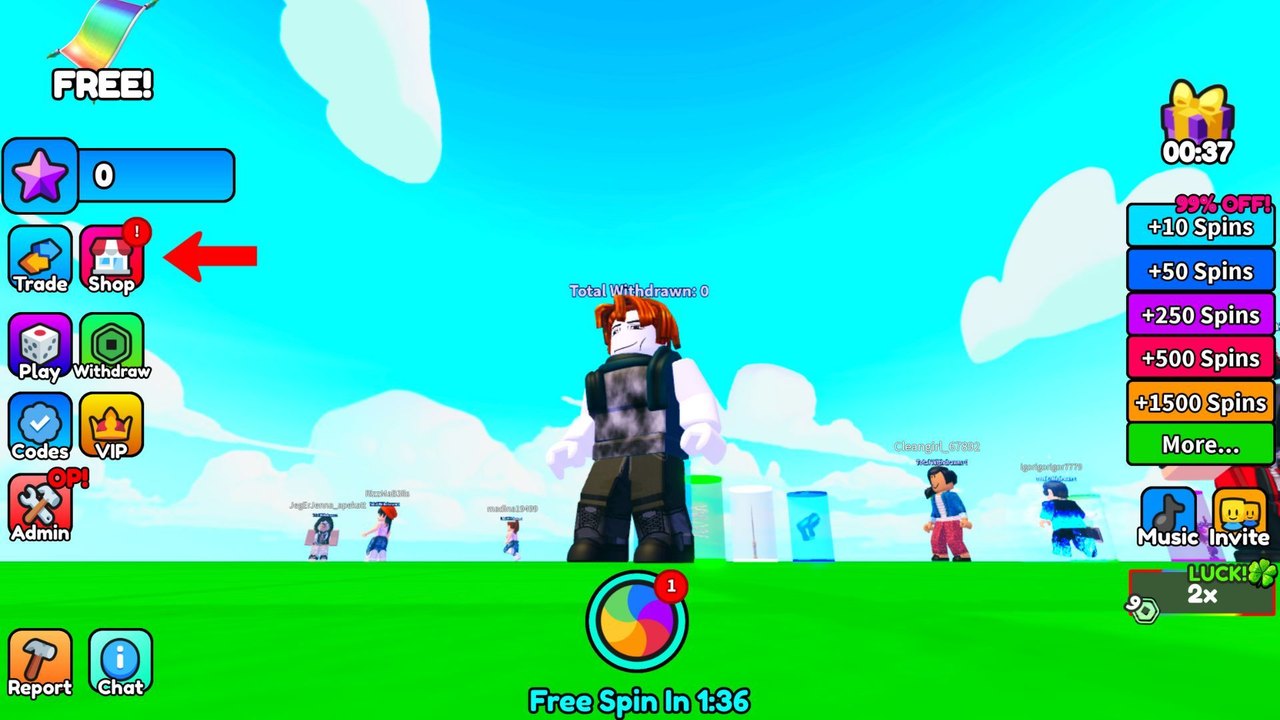
Spin For Free uses default Roblox movement and a custom HUD. If you cannot find Codes, you do not have a skill issue — the studio has shipped more than one icon set. This page names every control that matters in the current lobby.
Movement is the same as any Roblox experience: WASD or left stick to walk, Space or the jump button, camera drag or right stick. You need movement only to reach AFK Arena and the puzzle kiosk. After that, your thumbs live on the HUD. Pair this page with how to play if you still need the loop, not just the buttons.
Left rail
| Control | What it does |
|---|---|
| Star bar | Session credits / points |
| Trade | Player trades. Ignore on day one. |
| Shop | Packs and paid shortcuts. Ranked on the tier list. |
| Play (dice) | Minigames, not the main wheel |
| Withdraw | Cash-out action. Read prizes first. |
| Codes | Promo entry on some builds |
| Gear / settings | Promo entry on the current build |
| VIP | Crown pass. See VIP. |
| Admin | Staff tools. Not yours. |
| Report | Roblox report |
| Chat | Default chat |
The FREE! ribbon at the top left is branding, not a button that grants a spin by itself.
Right rail
| Control | What it does |
|---|---|
| Gift | Timed claim |
| +10 to +1500 | Spin packs, often with a 99% off label |
| More… | Extra shop rows |
| Music | Soundtrack toggle |
| Invite | Friend invite |
| LUCK 2x | Active luck window indicator |
When LUCK 2x is lit, stop browsing Shop and tap the wheel. That chip is the most important right-rail object after the gift timer.
Bottom center
The circular color wheel is the spin button. The text under it is the free-spin countdown. If you tap everything except this button you will collect spins and never spend them. New players do this more than they admit.
PC versus mobile
On PC, hover labels help, but the icons are still the same. On mobile, the left rail can feel cramped; scroll the stack if Codes is hidden under VIP. Do not rotate into a tiny landscape window or the Redeem field may sit under the keyboard. The redeem guide has the exact submit order.
Gamepad uses Roblox’s default mapping for move and jump. HUD taps still need a cursor or touch. This is not a game you play thumbs-only on a controller without a tap method.
What not to bind
You do not need custom keybinds. You need a habit: glance countdown, glance luck, glance gift, tap wheel. The spin planner turns that habit into a first-hour list. The getting started guide puts the same glance into the first fifteen minutes.
If a patch moves Codes from the left rail into Gear, trust the menu that actually contains a text field. The updates hub will note HUD moves when we see them.
Learn these icons once. After that, Spin For Free is a timer game, not a control game.
Frequently Asked Questions
Quick answers players actually search for in Spin For Free.
How do I spin in Spin For Free?
Tap the color wheel at the bottom center. The left-rail Play dice is a minigame, not the main spin.
Where are codes on mobile?
Left rail: Gear or Codes. If the keyboard covers Submit, close the chat bar first. Full steps: how to redeem.
What does the luck chip mean?
LUCK 2x on the right rail means a multiplier window is active. Spend spins during that window.
Can I hide the HUD?
Not really. The HUD is the game. You can mute Music on the right rail if the lobby is loud.